What is the DX Dash feature?
DX Dash is a shareable, public snapshot of your Club Log activity, built to give you - or interested visitors - a visually engaging way to see your station in action.
Your dashboard address: https://clublog.org/dx-dash/YOURCALL
Here is an example:
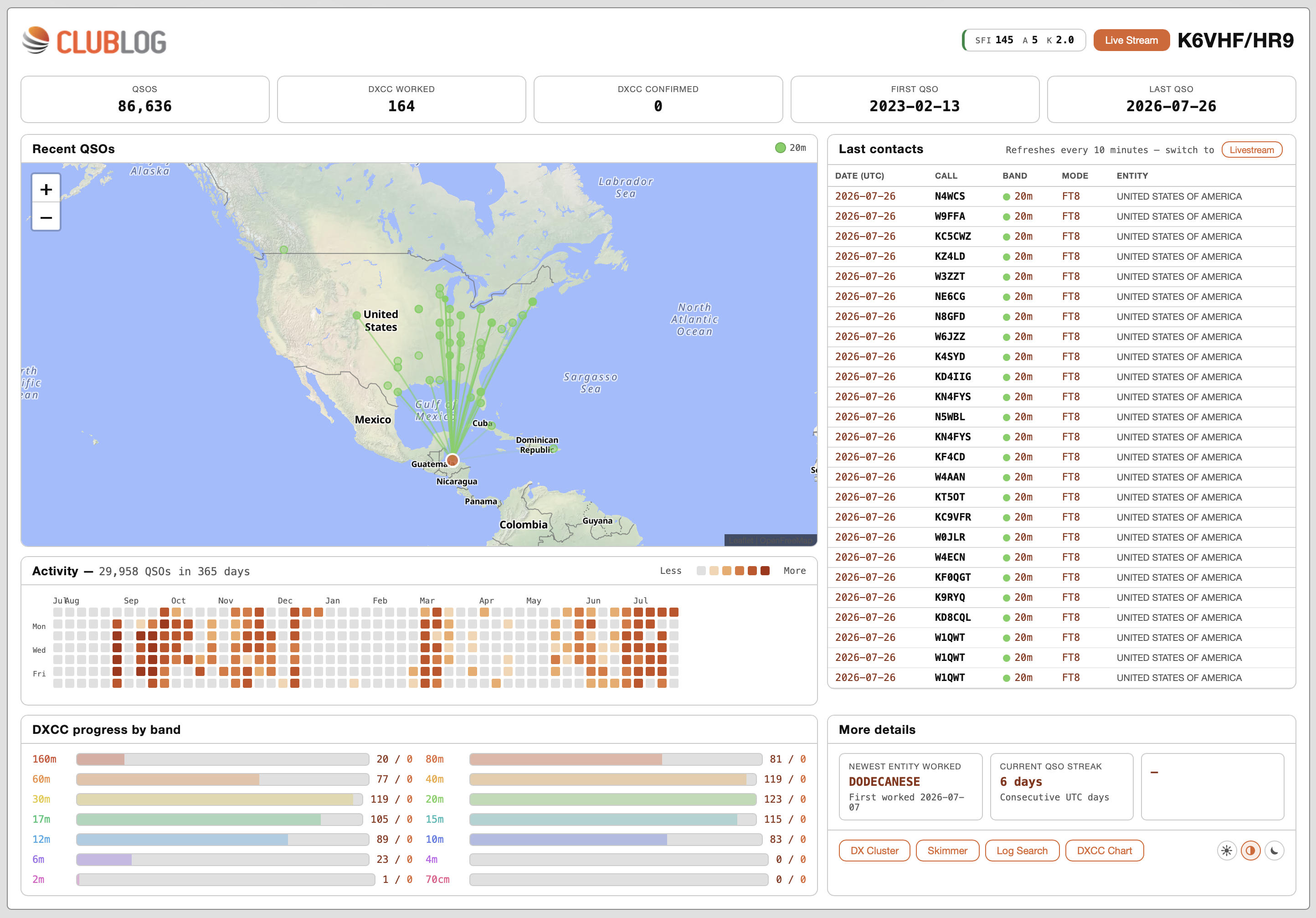
What it shows
- Headline stats: total QSOs, DXCC worked, DXCC confirmed, and your first/last logged QSO.
- Recent QSOs map: your last 50 contacts plotted on a world map, using grid squares where available.
- Last contacts table: date, callsign, band, mode and entity for those same QSOs, refreshing automatically every 10 minutes.
- Activity heatmap: a year's view of which days you've been on the air.
- DXCC progress by band: worked and confirmed entity counts, broken down per band.
- Highlights: your most recently worked new DXCC entity and your current on-air streak.
- Space weather: the latest SFI, A and K indices, so visitors can see propagation conditions at a glance.
- Quick links out to DX Cluster, Skimmer, Log Search and your DXCC Chart.
If your callsign is flagged as an active expedition, or you've enabled Livestream, buttons for those appear automatically in the header too.
Turning it on
DX Dash uses the same opt-in as the "Last 10 QSOs" widget:
1. Log in to Club Log and go to Settings.
2. Find "Activate the last 10 QSOs and stats tool on your account?" and select Yes, allow this tool.
3. Save your settings.
Once enabled, your dashboard is live at your dashboard address. If it's disabled, or your callsign isn't found, visitors see a friendly message explaining how to enable it.
Embedding it
DX Dash is not designed to sit inside an <iframe> on an external page, for example, your QRZ.com biography. It uses a large screen area and is unlikely to be presented cleanly inside an iFrame, so I recommend you link to the URL of your DX Dash instead of trying to embed it.
Privacy
Only data you've chosen to share via the Last 10 opt-in is shown. Turning the setting off immediately takes your dashboard offline for other visitors.
Was this article helpful?
That’s Great!
Thank you for your feedback
Sorry! We couldn't be helpful
Thank you for your feedback
Feedback sent
We appreciate your effort and will try to fix the article